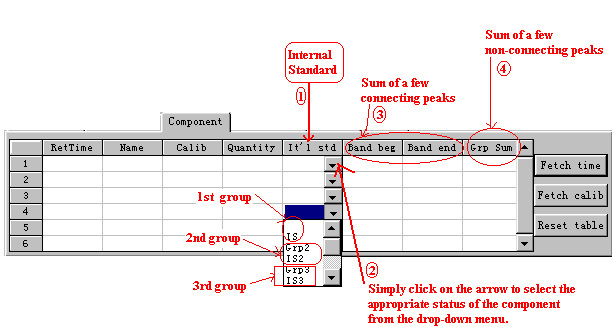
| ◇The Component Table is for you to conveniently
identify the components and Internal standard by their expected retention times, their
name, their calibrators and their known quantities, if applicable. This software permits
you to add more than one Internal standard to be applied to different groups of
components. This way of identifying component and Internal standard is indeed very
convenient. You can make use of the remaining three columns to calculate the aggregated
quantity of a few components. For connected peaks, you can make use of the "Band
beg (begin)", and "Band end". For non-connecting peaks, you can
make use of the Grp (group) sum column to identify the peaks.
|
|
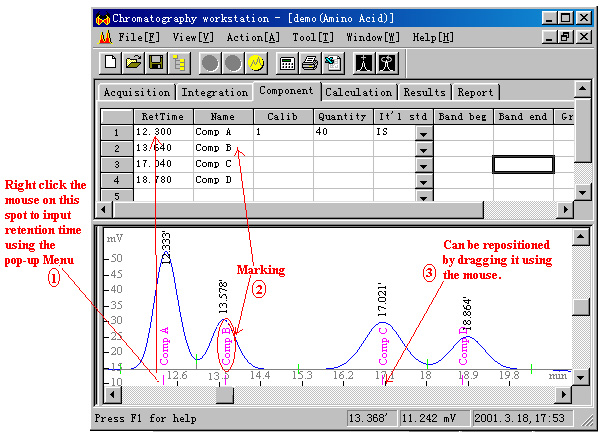
| ◇For each component identified in this table, a marking
would be made on the x-axis accompanied by its given name. When deciding whether a
component is present or not, so long as the marking on the x-axis lies within the Start
Point and End Point of a peak, the component corresponding to that peak is
regarded as present. Input of retention time can be done by right clicking on the mouse to
select the command from the Pop-up menu. The time corresponding to the position
where you right click on the mouse would be captured in the RetTime (retention
time) column. In the case of changes in retention time, you can conveniently reposition
the marking by simply dragging it with the cursor. The time captured in the RetTime
column will also be adjusted automatically.
|